All Categories
-
Integrated Circuits (ICs)
Integrated Circuits (ICs)
- Interface - Sensor, Capacitive Touch(642)
- Specialized ICs(12302)
- Power Management (PMIC) - Special Purpose Regulators(5644)
- Power Management (PMIC) - Voltage Regulators - Linear Regulator Controllers(793)
- Power Management (PMIC) - Voltage Regulators - Linear + Switching(1829)
- Power Management (PMIC) - Voltage Regulators - Linear, Low Drop Out (LDO) Regulators(70981)
- Power Management (PMIC) - Voltage Regulators - DC DC Switching Regulators(39569)
- Power Management (PMIC) - DC DC Switching Controllers(13507)
- Power Management (PMIC) - Voltage Reference(9453)
- Power Management (PMIC) - V/F and F/V Converters(145)
- Power Management (PMIC) - Thermal Management(592)
- Power Management (PMIC) - Supervisors(47946)
- Power Management (PMIC) - RMS to DC Converters(170)
- Power Management (PMIC) - Power Supply Controllers, Monitors(2104)
- Power Management (PMIC) - Power Over Ethernet (PoE) Controllers(1008)
- Power Management (PMIC) - Power Management - Specialized(7722)
- Power Management (PMIC) - Power Distribution Switches, Load Drivers(7706)
- Power Management (PMIC) - PFC (Power Factor Correction)(1222)
- Power Management (PMIC) - OR Controllers, Ideal Diodes(705)
- Power Management (PMIC) - Motor Drivers, Controllers(4712)
- Power Management (PMIC) - Lighting, Ballast Controllers(560)
- Power Management (PMIC) - LED Drivers(7282)
- Power Management (PMIC) - Laser Drivers(573)
- Power Management (PMIC) - Hot Swap Controllers(2816)
- Power Management (PMIC) - Gate Drivers(7083)
- Power Management (PMIC) - Full Half-Bridge (H Bridge) Drivers(1342)
- Power Management (PMIC) - Energy Metering(654)
- Power Management (PMIC) - Display Drivers(1435)
- Power Management (PMIC) - Current Regulation/Management(1481)
- Power Management (PMIC) - Battery Management(5553)
- Power Management (PMIC) - Battery Chargers(3831)
- Power Management (PMIC) - AC DC Converters, Offline Switchers(4905)
- Memory - Controllers(358)
- Memory - Configuration PROMs for FPGAs(639)
- Memory - Batteries(13)
- Memory - Memory(65694)
- Logic - Universal Bus Functions(706)
- Logic - Translators, Level Shifters(2854)
- Logic - Specialty Logic(1870)
- Logic - Signal Switches, Multiplexers, Decoders(9420)
- Logic - Shift Registers(2665)
- Logic - Parity Generators and Checkers(335)
- Logic - Multivibrators(831)
- Logic - Latches(3658)
- Logic - Gates and Inverters - Multi-Function, Configurable(1687)
- Logic - Gates and Inverters(16453)
- Logic - Flip Flops(7780)
- Logic - FIFOs Memory(4240)
- Logic - Counters, Dividers(3456)
- Logic - Comparators(592)
- Logic - Buffers, Drivers, Receivers, Transceivers(17835)
- Linear - Video Processing(2909)
- Linear - Comparators(5084)
- Linear - Analog Multipliers, Dividers(263)
- Linear - Amplifiers - Video Amps and Modules(1905)
- Linear - Amplifiers - Special Purpose(1856)
- Linear - Amplifiers - Instrumentation, OP Amps, Buffer Amps(34236)
- Linear - Amplifiers - Audio(4567)
- Interface - Voice Record and Playback(556)
- Interface - UARTs (Universal Asynchronous Receiver Transmitter)(1237)
- Interface - Telecom(4467)
- Interface - Specialized(4833)
- Interface - Signal Terminators(333)
- Interface - Signal Buffers, Repeaters, Splitters(1449)
- Interface - Serializers, Deserializers(1480)
- Interface - Sensor and Detector Interfaces(1524)
- Interface - Modules(169)
- Interface - Modems - ICs and Modules(407)
- Interface - I/O Expanders(1136)
- Interface - Filters - Active(1226)
- Interface - Encoders, Decoders, Converters(714)
- Interface - Drivers, Receivers, Transceivers(20755)
- Interface - Direct Digital Synthesis (DDS)(117)
- Interface - Controllers(3628)
- Interface - CODECS(1676)
- Interface - Analog Switches, Multiplexers, Demultiplexers(12567)
- Interface - Analog Switches - Special Purpose(2533)
- Embedded - System On Chip (SoC)(4496)
- Embedded - PLDs (Programmable Logic Device)(971)
- Embedded - Microprocessors(10083)
- Embedded - Application Specific Microcontrollers(2275)
- Embedded - Microcontrollers(99285)
- Embedded - Microcontrollers, Microprocessor, FPGA Modules(1527)
- Embedded - FPGAs (Field Programmable Gate Array) with Microcontrollers(81)
- Embedded - FPGAs (Field Programmable Gate Array)(27747)
- Embedded - DSP (Digital Signal Processors)(4081)
- Embedded - CPLDs (Complex Programmable Logic Devices)(5187)
- Data Acquisition - Touch Screen Controllers(1210)
- Data Acquisition - Digital to Analog Converters (DAC)(14419)
- Data Acquisition - Digital Potentiometers(6250)
- Data Acquisition - Analog to Digital Converters (ADC)(17776)
- Data Acquisition - Analog Front End (AFE)(787)
- Data Acquisition - ADCs/DACs - Special Purpose(3043)
- Clock/Timing - Real Time Clocks(2446)
- Clock/Timing - Programmable Timers and Oscillators(23469)
- Clock/Timing - IC Batteries(4)
- Clock/Timing - Delay Lines(1049)
- Clock/Timing - Clock Generators, PLLs, Frequency Synthesizers(32775)
- Clock/Timing - Clock Buffers, Drivers(4568)
- Clock/Timing - Application Specific Clock/Timing(8652)
- Audio Special Purpose(1564)
Relevant Manufacturer


-
Discrete Semiconductor Products
Discrete Semiconductor Products
- Current Regulation - Diodes, Transistors(1090)
- Transistors - Special Purpose(226)
- Transistors - Programmable Unijunction(48)
- Transistors - JFETs(1558)
- Transistors - IGBTs - Single(4799)
- Transistors - IGBTs - Modules(63420)
- Transistors - IGBTs - Arrays(26)
- Transistors - FETs, MOSFETs - Single(48330)
- Transistors - FETs, MOSFETs - RF(4903)
- Transistors - FETs, MOSFETs - Arrays(6641)
- Transistors - Bipolar (BJT) - Single, Pre-Biased(4539)
- Transistors - Bipolar (BJT) - Single(25800)
- Transistors - Bipolar (BJT) - RF(2087)
- Transistors - Bipolar (BJT) - Arrays, Pre-Biased(2115)
- Transistors - Bipolar (BJT) - Arrays(2310)
- Thyristors - TRIACs(4044)
- Thyristors - SCRs - Modules(3967)
- Thyristors - SCRs(5436)
- Thyristors - DIACs, SIDACs(319)
- Power Driver Modules(1627)
- Diodes - Zener - Single(87483)
- Diodes - Zener - Arrays(2619)
- Diodes - Variable Capacitance (Varicaps, Varactors)(1200)
- Diodes - RF Diodes(2753)
- Diodes - Rectifiers - Single(67528)
- Diodes - Rectifiers - Arrays(20581)
- Diodes - Bridge Rectifiers(11700)
Relevant Manufacturer


-
RF and Wireless
RF and Wireless
- Subscriber Identification Module (SIM) Cards(77)
- RF Circulators and Isolators(1742)
- RFID, RF Access, Monitoring ICs(1550)
- RFID Transponders, Tags(747)
- RFID Reader Modules(464)
- RFID Evaluation and Development Kits, Boards(30)
- RFID Antennas(329)
- RFI and EMI - Shielding and Absorbing Materials(6444)
- RFI and EMI - Contacts, Fingerstock and Gaskets(7497)
- RF Transmitters(668)
- RF Transceiver Modules and Modems(6900)
- RF Transceiver ICs(4169)
- RF Switches(9276)
- RF Shields(16401)
- RF Receivers(1998)
- RF Receiver, Transmitter, and Transceiver Finished Units(2763)
- RF Power Dividers/Splitters(1223)
- RF Power Controller ICs(86)
- RF Modulators(710)
- RF Mixers(2800)
- RF Misc ICs and Modules(3276)
- RF Front End (LNA + PA)(419)
- RF Evaluation and Development Kits, Boards(747)
- RF Directional Coupler(2718)
- RF Multiplexers(1464)
- RF Detectors(412)
- RF Demodulators(249)
- RF Antennas(12319)
- RF Amplifiers(19651)
- Balun(1496)
- Attenuators(4852)
Relevant Manufacturer


-
Optoelectronics
Optoelectronics
- Optomechanical(480)
- Lighting Fixtures(125)
- Laser Diodes, Laser Modules - Laser Delivery, Laser Fibers(345)
- HeNe Laser Systems(31)
- HeNe Laser Heads(27)
- Display Backlights(93)
- Xenon Lighting(387)
- Touch Screen Overlays(453)
- Panel Indicators, Pilot Lights(75729)
- Remote Phosphor Light Source(269)
- Reflectors(665)
- Light Pipes(5384)
- Lenses(4951)
- Spacers, Standoffs(2718)
- Lamp Replacements(29718)
- Circuit Board Indicators, Arrays, Light Bars, Bar Graphs(9083)
- LED Thermal Products(667)
- LED Lighting Kits(64)
- LED White Lighting(37580)
- LED Color Lighting(4728)
- LED COBs, Engines, Modules, Strips(28735)
- LED Indication - Discrete(27601)
- Laser Diodes, Modules(1553)
- Incandescent, Neon Lamps(311004)
- Cold Cathode Fluorescent (CCFL) & UV Lamps(164)
- Ballasts, Inverters(7728)
- LED Emitters - Infrared, UV, Visible(3871)
- Fiber Optic Transmitters - Drive Circuitry Integrated(4085)
- Fiber Optic Transmitters - Discrete(350)
- Fiber Optic Transceiver Modules(18758)
- Fiber Optic Switches, Multiplexers, Demultiplexers(1387)
- Fiber Optic Receivers(695)
- Fiber Optic Attenuators(654)
- Electroluminescent(102)
- Display, Monitor - LCD Driver/Controller(98)
- Vacuum Fluorescent (VFD)(249)
- LED Dot Matrix and Cluster(865)
- LED Character and Numeric(5421)
- LCD, OLED, Graphic(4654)
- LCD, OLED Character and Numeric(2202)
- Display Bezels, Lenses(88)
- LED Addressable, Specialty(458)
Relevant Manufacturer


-
Sensors, Transducers
Sensors, Transducers
- Industrial Sensors - Ultrasonic Receivers, Transmitters - Industrial(115)
- Industrial Sensors - Thermostats - Mechanical - Industrial(3103)
- Industrial Sensors - Temperature Sensors - Analog and Digital Output - Industrial(209)
- Industrial Sensors - Proximity Sensors - Industrial(13611)
- Industrial Sensors - Pressure Sensors, Transducers - Industrial(26503)
- Optical Sensors - Photonics - Counters, Detectors, SPCM (Single Photon Counting Module)(751)
- Optical Sensors - Camera Modules(875)
- Industrial Sensors - Position, Proximity, Speed (Modules) - Industrial(554)
- Industrial Sensors - Force Sensors, Load Cells - Industrial(346)
- Industrial Sensors - Flow Sensors - Industrial(151)
- Industrial Sensors - Float, Level Sensors - Industrial(310)
- Industrial Sensors - Encoders - Industrial(4980)
- Industrial Sensors - Color Sensors - Industrial(50)
- Touch Sensors(100)
- Ultrasonic Receivers, Transmitters(2421)
- Temperature Sensors - Thermostats - Solid State(1096)
- Temperature Sensors - Thermostats - Mechanical(3397)
- Temperature Sensors - Thermocouples, Temperature Probes(1921)
- Temperature Sensors - RTD (Resistance Temperature Detector)(1525)
- Temperature Sensors - PTC Thermistors(2273)
- Temperature Sensors - NTC Thermistors(13259)
- Temperature Sensors - Analog and Digital Output(3928)
- Strain Gauges(1399)
- Specialized Sensors(1861)
- Solar Cells(503)
- Shock Sensors(84)
- Sensor Interface - Junction Blocks(2519)
- Sensor Cable - Assemblies(22011)
- Proximity/Occupancy Sensors - Finished Units(725)
- Proximity Sensors(2860)
- Pressure Sensors, Transducers(11317)
- Position Sensors - Angle, Linear Position Measuring(6022)
- Optical Sensors - Reflective - Logic Output(194)
- Optical Sensors - Reflective - Analog Output(432)
- Optical Sensors - Phototransistors(1027)
- Optical Sensors - Photointerrupters - Slot Type - Transistor Output(1427)
- Optical Sensors - Photointerrupters - Slot Type - Logic Output(1215)
- Industrial Sensors - Photoelectric, Industrial(16763)
- Optical Sensors - Photodiodes(1543)
- Optical Sensors - Photo Detectors - Remote Receiver(2605)
- Optical Sensors - Photo Detectors - Logic Output(146)
- Optical Sensors - Photo Detectors - CdS Cells(74)
- Optical Sensors - Distance Measuring(377)
- Optical Sensors - Ambient Light, IR, UV Sensors(1305)
- Multifunction(558)
- Motion Sensors - Vibration Sensors(337)
- Motion Sensors - Tilt Switches(67)
- Motion Sensors - Optical Motion Sensors(719)
- Motion Sensors - Inclinometers(175)
- Motion Sensors - IMUs (Inertial Measurement Units)(416)
- Motion Sensors - Gyroscopes(214)
- Motion Sensors - Accelerometers(1911)
- Magnets - Sensor Matched Magnets(119)
- Magnets - Multi Purpose Magnets(1965)
- Magnetic Sensors - Switches (Solid State)(3700)
- Magnetic Sensors - Position, Proximity, Speed (Modules)(5199)
- Magnetic Sensors - Linear, Compass (ICs)(1247)
- Magnetic Sensors - Compass, Magnetic Field (Modules)(35)
- LVDT Transducers (Linear Variable Differential Transformer)(204)
- IrDA Transceiver Modules(196)
- Optical Sensors - Image Sensors, Camera(2235)
- Humidity, Moisture Sensors(1425)
- Gas Sensors(1217)
- Force Sensors, Load Cells(188)
- Flow Sensors(550)
- Float, Level Sensors(1343)
- Encoders(6357)
- Particle, Dust Sensors(43)
- Current Sensors(3455)
- Color Sensors(85)
- Sensor, Transducer Amplifiers(1905)
Relevant Manufacturer


-
Connectors, Interconnects
Connectors, Interconnects
- USB, DVI, HDMI Connectors(446)
- Solid State Lighting Connectors(555)
- Sockets for ICs, Transistors(953)
- Pluggable Connectors(1221)
- Photovoltaic (Solar Panel) Connectors(136)
- Fiber Optic Connectors(370)
- FFC, FPC (Flat Flexible) Connectors(761)
- D-Sub, D-Shaped Connectors(2887)
- Coaxial Connectors (RF)(2389)
- Circular Connectors(14162)
- Blade Type Power Connectors(273)
- AC Power Connectors - Plugs and Receptacles(2597)
- USB, DVI, HDMI Connectors - USB, DVI, HDMI Connector Adapters(572)
- USB, DVI, HDMI Connectors - USB, DVI, HDMI Connector Assemblies(4298)
- Terminals - Wire to Board Connectors(217)
- Terminals - Wire Splice Connectors(4322)
- Terminals - Wire Pin Connectors(328)
- Terminals - Turret Connectors(1273)
- Terminals - Specialized Connectors(2042)
- Terminals - Spade Connectors(3902)
- Terminals - Solder Lug Connectors(345)
- Terminals - Screw Connectors(745)
- Terminals - Ring Connectors(12596)
- Terminals - Lugs(4747)
- Terminals - Quick Connects, Quick Disconnect Connectors(8514)
- Terminals - PC Pin, Single Post Connectors(3776)
- Terminals - PC Pin Receptacles, Socket Connectors(5883)
- Terminals - Magnetic Wire Connectors(1653)
- Terminals - Knife Connectors(112)
- Terminals - Housings, Boots(2850)
- Terminals - Foil Connectors(108)
- Terminals - Barrel, Bullet Connectors(1107)
- Terminals - Terminal Adapters(137)
- Terminal Strips and Turret Boards(1159)
- Terminal Junction Systems(2533)
- Terminal Blocks - Wire to Board(43615)
- Terminal Blocks - Specialized(3722)
- Terminal Blocks - Power Distribution(847)
- Terminal Blocks - Panel Mount(1359)
- Terminal Blocks - Interface Modules(1819)
- Terminal Blocks - Headers, Plugs and Sockets(119920)
- Terminal Blocks - Din Rail, Channel(9373)
- Terminal Blocks - Terminal Block Contacts(65)
- Terminal Blocks - Barrier Blocks(47517)
- Terminal Blocks - Terminal Block Adapters(1059)
- Solid State Lighting Connectors - Solid State Lighting Connector Contacts(271)
- Solid State Lighting Connectors - Solid State Lighting Connector Assemblies(1344)
- Sockets for ICs, Transistors - Socket Adapters(275)
- Sockets for ICs, Transistors - IC Sockets(22148)
- Shunts, Jumpers(907)
- Rectangular Connectors - Spring Loaded(7721)
- Rectangular Connectors - Rectangular Connector Housings(43023)
- Rectangular Connectors - Headers, Specialty Pin(6129)
- Rectangular Connectors - Headers, Receptacles, Female Sockets(229601)
- Rectangular Connectors - Headers, Male Pins(543338)
- Rectangular Connectors - Free Hanging, Panel Mount(30142)
- Rectangular Connectors - Rectangular Connector Contacts(10681)
- Rectangular Connectors - Board In, Direct Wire to Board(2432)
- Rectangular Connectors - Rectangular Connector Adapters(475)
- Rectangular - Board to Board Connectors - Headers, Receptacles, Female Sockets(9)
- Rectangular - Board to Board Connectors - Headers, Male Pins(2)
- Rectangular Connectors - Board Spacers, Stackers (Board to Board)(238901)
- Rectangular Connectors - Arrays, Edge Type, Mezzanine (Board to Board)(37853)
- AC Power Connectors - Power Entry Modules (PEM)(10310)
- Pluggable Connectors - Pluggable Connector Assemblies(6049)
- Photovoltaic (Solar Panel) Connectors - Photovoltaic (Solar Panel) Connector Contacts(77)
- Photovoltaic (Solar Panel) Connectors - Photovoltaic (Solar Panel) Connector Assemblies(504)
- Modular/Ethernet Connectors - Modular/Ethernet Connector Wiring Blocks(99)
- Modular/Ethernet Connectors - Modular/Ethernet Connector (RJ45, RJ11) Plugs(1674)
- Modular/Ethernet Connectors - Modular/Ethernet Connector Plug Housings(181)
- Modular/Ethernet Connectors - Modular/Ethernet Connector (RJ45) Jacks With Magnetics(10152)
- Modular/Ethernet Connectors - Modular/Ethernet Connector (RJ45, RJ11) Jacks(23416)
- Modular/Ethernet Connectors - Modular/Ethernet Connector Adapters(855)
- Memory Connectors - PC Cards - Adapters(21)
- Memory Connectors - PC Card Sockets(3299)
- Memory Connectors - Inline Module Sockets(3390)
- LGH Connectors(764)
- Keystone Connectors - Keystone Inserts(2758)
- Keystone Connectors - Keystone Faceplates, Frames(1926)
- Heavy Duty Connectors - Heavy Duty Connector Inserts, Modules(4190)
- Heavy Duty Connectors - Heavy Duty Connector Housings, Hoods, Bases(17226)
- Heavy Duty Connectors - Heavy Duty Connector Frames(523)
- Heavy Duty Connectors - Heavy Duty Connector Contacts(1832)
- Heavy Duty Connectors - Heavy Duty Connector Assemblies(671)
- Fiber Optic Connectors - Fiber Optic Connector Housings(919)
- Fiber Optic Connectors - Fiber Optic Connector Adapters(4455)
- Fiber Optic Connectors - Fiber Optic Connector Assemblies(3001)
- FFC, FPC (Flat Flexible) Connectors - FFC, FPC (Flat Flexible) Connector Housings(652)
- FFC, FPC (Flat Flexible) Connectors - FFC, FPC (Flat Flexible) Connector Contacts(202)
- FFC, FPC (Flat Flexible) Connectors - FFC, FPC (Flat Flexible) Connector Assemblies(18691)
- D-Sub, D-Shaped Connectors - D-Sub, D-Shaped Connector Terminators(47)
- D-Sub, D-Shaped Connectors - D-Sub, D-Shaped Connector Housings(12238)
- D-Sub, D-Shaped Connectors - D-Sub, D-Shaped Connector Contacts(2714)
- D-Sub, D-Shaped Connectors - D-Sub, D-Shaped Connector Backshells, Hoods(5995)
- D-Sub, D-Shaped Connectors - D-Sub, D-Shaped Connector Adapters(1304)
- D-Sub, D-Shaped Connectors - D-Sub Connector Assemblies(141346)
- D-Sub, D-Shaped Connectors - Centronics Connectors(8770)
- Contacts - Contacts, Spring Loaded (Pogo Pins), and Pressure(630)
- Contacts - Multi Purpose(6196)
- Contacts - Leadframe(122)
- Coaxial Connectors (RF) - Coaxial Connector (RF) Terminators(1231)
- Coaxial Connectors (RF) - Coaxial Connector (RF) Contacts(480)
- Coaxial Connectors (RF) - Coaxial Connector (RF) Adapters(6386)
- Coaxial Connectors (RF) - Coaxial Connector (RF) Assemblies(25734)
- Circular Connectors - Circular Connector Housings(441226)
- Circular Connectors - Circular Connector Contacts(4737)
- Circular Connectors - Backshells and Cable Clamps(53692)
- Circular Connectors - Circular Connector Adapters(8839)
- Circular Connectors - Circular Connector Assemblies(1196254)
- Card Edge Connectors - Card Edge Connector Housings(469)
- Card Edge Connectors - Edgeboard Connectors(672683)
- Card Edge Connectors - Card Edge Connector Contacts(325)
- Card Edge Connectors - Card Edge Connector Adapters(73)
- Blade Type Power Connectors - Blade Type Power Connector Housings(837)
- Blade Type Power Connectors - Blade Type Power Connector Contacts(393)
- Blade Type Power Connectors - Blade Type Power Connector Assemblies(4163)
- Between Series Adapters(649)
- Barrel Connectors - Power Connectors(935)
- Barrel Connectors - Audio Connectors(2432)
- Barrel Connectors - Barrel Connector Adapters(92)
- Banana and Tip Connectors - Jacks, Plugs(1644)
- Banana and Tip Connectors - Binding Posts(239)
- Banana and Tip Connectors - Banana and Tip Connector Adapters(75)
- Backplane Connectors - Specialized(45586)
- Backplane Connectors - Backplane Connector Housings(6863)
- Backplane Connectors - Hard Metric, Standard(6297)
- Backplane Connectors - DIN 41612(9408)
- Backplane Connectors - Backplane Connector Contacts(3583)
- Backplane Connectors - ARINC Inserts(2357)
- Backplane Connectors - ARINC(3789)
Relevant Manufacturer


-
Resistors
-
Capacitors
Capacitors
- Aluminum Capacitors(16817)
- Trimmers, Variable Capacitors(3151)
- Thin Film Capacitors(3473)
- Tantalum Capacitors(136103)
- Tantalum - Polymer Capacitors(9778)
- Silicon Capacitors(320)
- Niobium Oxide Capacitors(330)
- Mica and PTFE Capacitors(9101)
- Film Capacitors(150406)
- Electric Double Layer Capacitors (EDLC), Supercapacitors(2782)
- Ceramic Capacitors(833829)
- Capacitor Networks, Arrays(2383)
- Aluminum Electrolytic Capacitors(125325)
- Aluminum - Polymer Capacitors(7544)
Relevant Manufacturer


-
Transformers
-
Isolators
Isolators
Relevant Manufacturer


-
Crystals, Oscillators, Resonators
-
Switches
Switches
- Interlock Switches(2893)
- Emergency Stop (E-Stop) Switches(1160)
- Cable Pull Switches(571)
- Toggle Switches(33608)
- Thumbwheel Switches(742)
- Tactile Switches(14263)
- Limit Switches(28077)
- Slide Switches(5166)
- Selector Switches(9720)
- Rotary Switches(13850)
- Rocker Switches(53790)
- Pushbutton Switches - Hall Effect(127)
- Pushbutton Switches(190826)
- Programmable Display Switches(39)
- Navigation Switches, Joystick(1882)
- Magnetic, Reed Switches(1399)
- Keypad Switches(637)
- Keylock Switches(3684)
- DIP Switches(7747)
- Configurable Switch Components - Configurable Switch Lens(1435)
- Configurable Switch Components - Configurable Switch Illumination Sources(1236)
- Configurable Switch Components - Configurable Switch Contact Blocks(1401)
- Configurable Switch Components - Configurable Switch Bodies(16077)
- Disconnect Switch Components(2567)
Relevant Manufacturer


-
Relays
Relays
- Safety Relays(1310)
- Reed Relays(1735)
- High Frequency (RF) Relays(1190)
- Contactors (Solid State)(686)
- Contactors (Electromechanical)(11952)
- Automotive Relays(1881)
- Solid State Relays (SSR)(10652)
- Signal Relays, Up to 2 Amps(9149)
- Relay Sockets(2075)
- Power Relays, Over 2 Amps(31604)
- I/O Relay Modules(712)
- I/O Relay Modules - Input(2)
- I/O Relay Module Racks(247)
Relevant Manufacturer


Select Language
Current Language
English
- English
- Deutsch
- Italia
- Français
- 日本語
- 한국의
- русский
- Svenska
- Nederland
- español
- Português
- polski
- Suomi
- Gaeilge
- Slovenská
- Slovenija
- Čeština
- Melayu
- Magyarország
- Hrvatska
- Dansk
- românesc
- Indonesia
- Ελλάδα
- Български език
- Afrikaans
- IsiXhosa
- isiZulu
- lietuvių
- Maori
- Kongeriket
- Монголулс
- O'zbek
- Tiếng Việt
- हिंदी
- اردو
- Kurdî
- Català
- Bosna
- Euskera
- العربية
- فارسی
- Corsa
- Chicheŵa
- עִבְרִית
- Latviešu
- Hausa
- Беларусь
- አማርኛ
- Republika e Shqipërisë
- Eesti Vabariik
- íslenska
- မြန်မာ
- Македонски
- Lëtzebuergesch
- საქართველო
- Cambodia
- Pilipino
- Azərbaycan
- ພາສາລາວ
- বাংলা ভাষার
- پښتو
- malaɡasʲ
- Кыргыз тили
- Ayiti
- Қазақша
- Samoa
- සිංහල
- ภาษาไทย
- Україна
- Kiswahili
- Cрпски
- Galego
- नेपाली
- Sesotho
- Тоҷикӣ
- Türk dili
- ગુજરાતી
- ಕನ್ನಡkannaḍa
- मराठी
USB PD and USB-C Compared: How They Work Together and Differ?
Time: April 24th, 2025
Browse: 3,930
As digital devices continue to grow, so does the need for faster, smarter, and more universal charging and connectivity solutions. Enter USB Power Delivery (USB PD) and USB-C—two technologies that are reshaping how we power and communicate with our devices. While USB PD focuses on delivering higher, adjustable power levels, USB-C provides a smooth, reversible connector capable of carrying both energy and data. Together, they simplify charging setups, reduce cable clutter, and improve compatibility across phones, laptops, tablets, and more. This article breaks down the inner workings, differences, and advantages of USB PD and USB-C to help you choose the right setup for your devices.

Catalog
Figure 1. USB PD vs USB-C
USB Power Delivery (USB PD) Overview
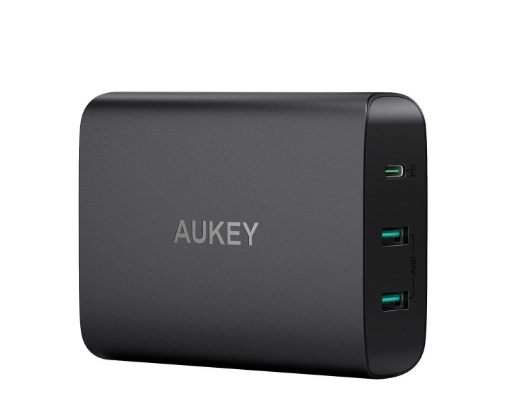
Figure 2. USB Power Delivery
USB Power Delivery, often called USB PD, is a fast-charging standard that allows a USB port to deliver much more power than older USB versions. While traditional USB ports could only handle small devices like basic peripherals or smartphones, USB PD can supply up to 100 watts of power—enough for larger electronics like laptops, monitors, and docking stations.
What makes USB PD different is its ability to adjust both voltage and current based on what a device actually needs. This flexibility supports a wider range of products and ensures efficient power delivery without wasting energy or risking device damage.
USB PD Power Profiles Work
USB PD 1.0 defined five power profiles. Each profile provides a specific combination of voltage and current, designed to match the needs of different types of devices.
Here’s a breakdown:
|
Profile |
Voltage |
Current |
Power
Output |
Typical
Devices |
|
Profile 1 |
5V |
2A |
10W |
Wireless earbuds, smartphones, mice |
|
Profile 2 |
12V |
1.5A |
18W |
Tablets, smartphones |
|
Profile 3 |
12V |
3A |
36W |
Light laptops, smartphones |
|
Profile 4 |
20V |
3A |
60W |
Standard laptops, docking stations |
|
Profile 5 |
20V |
5A |
100W |
Gaming laptops, external monitors, docks |
Chart 1. USB Power Profiles
Each step up in the profile ladder increases the available power. As devices request more power, USB PD responds by raising either the voltage, the current, or both, depending on what the device supports.
USB PD Compared to Older Standards
Older USB standards, like USB 2.0 and USB 3.0, could only deliver 2.5W and 4.5W, respectively. These limits were fine for basic charging, but they couldn’t keep up with the demands of modern hardware. USB PD solves this by allowing dynamic power negotiation between the charger and the device. This ensures that each connected device receives the optimal amount of power, no more, no less. The result is faster charging, better energy efficiency, and improved safety for sensitive electronics.
Understanding USB-C
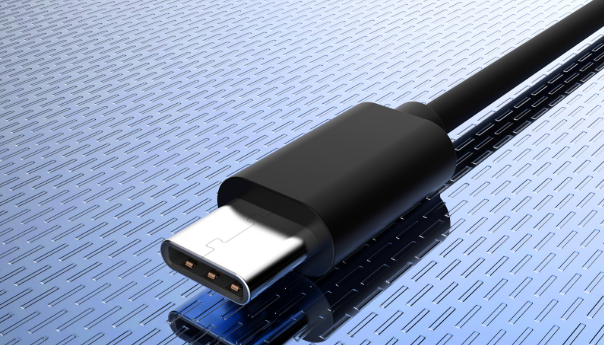
Figure 3. USB-C
USB-C is a modern connector designed for both power delivery and high-speed data transfer. It uses a 24-pin interface packed into a small, oval-shaped plug that’s the same on both sides. This means you can insert it in either direction, without needing to flip the cable to find the “right” side. This simple design solves a common frustration with older connectors that only worked one way. Whether you're charging your phone in the dark or quickly plugging in a laptop, USB-C makes the connection process smoother and more reliable.
Inside a USB-C cable, the 24 pins are organized into a layout that supports efficient, two-way communication and power flow. Here’s how they’re typically arranged:
• 4 pins are dedicated to delivering power. These allow USB-C to support fast charging by carrying higher currents.
• 16 pins manage data transfer. They can transmit signals in both directions, enabling fast uploads and downloads at the same time.
• 4 pins are used for grounding. This ensures stability and safety by preventing electrical faults.
This balanced pin structure is what allows USB-C to send power and data through either end of the cable, unlike some earlier USB versions that had a clear “host” and “device” side.
USB-C isn’t just about convenience, it’s built for performance. It supports data transfer rates of up to 10 gigabits per second. That’s twice the speed of USB 3.0 and around 20 times faster than USB 2.0. These faster speeds mean large files can move quickly, whether you’re transferring videos, syncing a phone, or connecting to an external hard drive.
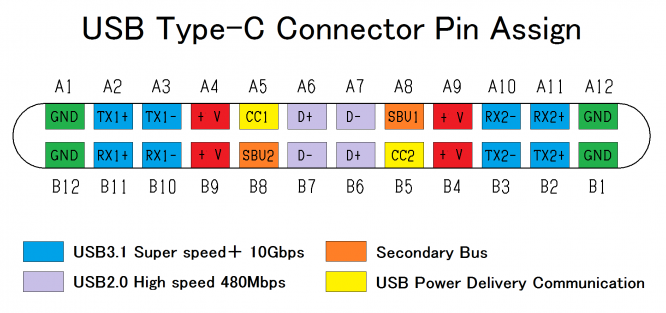
Figure 4. Usb-C Connector Pins
In terms of charging, USB-C supports fast power delivery on both ends of the cable. That means you can plug in your charger from either side and still get full-speed charging for devices like phones, tablets, and even power-hungry laptops. USB-C was created to simplify and unify the way devices connect. It's now common across a wide range of electronics, smartphones, laptops, tablets, monitors, and docking stations all use it. The goal was to eliminate the need for different cables for different tasks, and USB-C largely succeeds by handling power, data, and even video signals in one streamlined connector.
How USB-C and USB Power Delivery Differ?
Even though USB-C and USB Power Delivery (USB PD) often work together, they serve very different roles. USB-C refers to the shape and physical design of the connector—the small, oval plug that fits in either direction. USB PD, on the other hand, is a technology standard that controls how electricity moves through that connector. In simple terms, USB-C is the port and cable you see and touch, while USB PD is the system that decides how much power flows through it.
Power Handling
Not all USB-C cables or ports are created equal. On its own, a standard USB-C setup usually supports up to 60 watts of power. That’s enough for most smartphones, tablets, and even some lightweight laptops. It does this by delivering 20 volts at 3 amps.
USB Power Delivery increases that power ceiling. With USB PD, the cable and port are designed to safely carry up to 100 watts—20 volts at 5 amps. This extra headroom allows USB PD to charge larger devices, like gaming laptops or external monitors, more efficiently and without overheating. To manage that higher power, USB PD cables use thicker internal wiring and better insulation. These changes aren't visible from the outside but make a big difference in safety and performance during charging.
Compatibility and Standards Support
The USB-C connector is built for flexibility. It can handle a variety of data and video protocols depending on the device and cable, including USB 2.0, USB 3.1, and Thunderbolt 3. That makes USB-C highly adaptable across a wide range of electronics—from smartphones and tablets to full-featured desktop docking stations.
USB PD doesn’t affect how devices transfer data, but it upgrades how they receive power. When both a device and its cable support USB PD, the system negotiates how much power is needed and safely delivers just the right amount. This negotiation happens automatically, with no user input, helping avoid overcharging or overheating.
Standard USB-C Cable Replace a USB PD Cable
A regular USB-C cable can be used in place of a USB PD cable, but there are important limitations to understand before doing so. Most standard USB-C cables are rated to carry up to 3 amps of current. This limits the total power they can deliver to around 60 watts. That’s fine for charging smartphones, tablets, and some lightweight laptops. But it’s not enough for devices that demand more power, like gaming laptops, large monitors, or docking stations.
While USB Power Delivery (USB PD) cables are built to handle up to 5 amps. This allows them to deliver up to 100 watts safely. To support that much power, USB PD cables include thicker internal wires and reinforced shielding that can manage the increased current without overheating or creating a safety risk.
USB PD Cable Convert to USB-C Manually
It’s technically possible to modify a USB PD cable by attaching a USB-C connector yourself, but the process involves precision and carries actual risk. To do this, you would need a few specialized tools: A replacement USB-C plug, a soldering iron, electrical tape, a wire stripper, and a crimping tool. The steps involve carefully stripping the insulation off the original cable, soldering each internal wire to the correct contact point on the new connector, then insulating the joint and securing the wires with a crimp. This isn’t just a quick DIY fix. It requires steady hands, knowledge of USB wiring layouts, and a lot of care to avoid shorts or unstable connections. Even small mistakes can make the cable unreliable—or even dangerous to use with high-powered electronics.
Unless you’re experienced with electronics work, it’s usually better to avoid modifying cables by hand. Buying a certified USB-C cable with Power Delivery support is faster, safer, and more reliable. These cables are designed, tested, and rated to handle high-power charging without the guesswork. In short, while a regular USB-C cable can get the job done for smaller devices, it’s best to use a proper USB PD cable for anything that requires more than 60 watts. It’s the most practical and secure choice for both performance and peace of mind.
Exploring USB-C Power Delivery (USB-C PD)
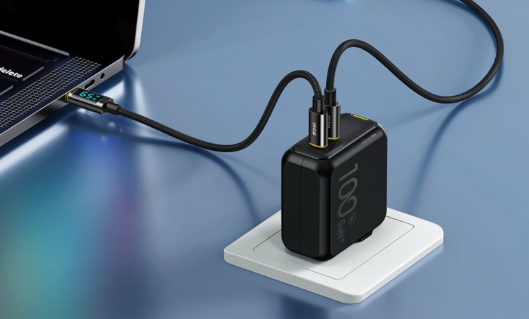
Figure 5. USB-C Power Delivery
USB-C Power Delivery, often called USB-C PD, combines the slim, reversible design of the USB-C connector with a powerful charging system capable of handling a wide range of devices. From smartphones and tablets to full-sized laptops, one USB-C PD cable can do it all, streamlining how we charge and connect our electronics.
The key to USB-C PD’s flexibility is its ability to deliver different amounts of power depending on what the connected device needs. This isn’t just a one-size-fits-all system. When you plug in a USB-C PD cable, the device and charger automatically coordinate to decide the appropriate amount of current and voltage. That built-in negotiation helps prevent overcharging and reduces wasted energy, which is especially useful in today’s tech environment, where you are phasing out bundled chargers.
Smarter Charging With USB-C PD 3.2
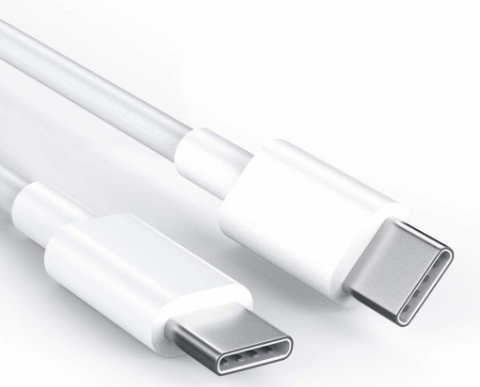
Figure 6. USB-C PD version 3.2
A major leap forward came in 2021 with the introduction of USB-C PD version 3.2. This update significantly expanded the power range, making the system even more versatile. It now supports up to 48 volts and as much as 240 watts—enough to power larger laptops, high-resolution monitors, or even small desktop systems through a single cable.
What sets USB-C PD 3.2 apart is its ability to respond to how a device is being used. If you're running demanding software on a laptop or using a high-performance accessory, the power output can automatically increase to match the load. Then, when the device returns to a lower-demand state, like idle mode, the power delivery scales back to conserve energy and reduce heat. This dynamic power management isn’t something you have to control manually. It happens seamlessly in the background, ensuring smooth performance without interruptions or overheating.
USB-C PD makes charging simpler and more efficient. Instead of managing different cables and adapters for every device, a single high-quality USB-C PD cable can handle most of your needs. And with the power capabilities introduced in USB-C PD 3.2, it's prepared for the demands of current and future devices. Whether you're charging a phone, powering a workstation, or keeping your travel gear minimal, USB-C PD offers a reliable and adaptable solution, all with a compact, accessible connector.
Choosing the Right USB-C Adapter
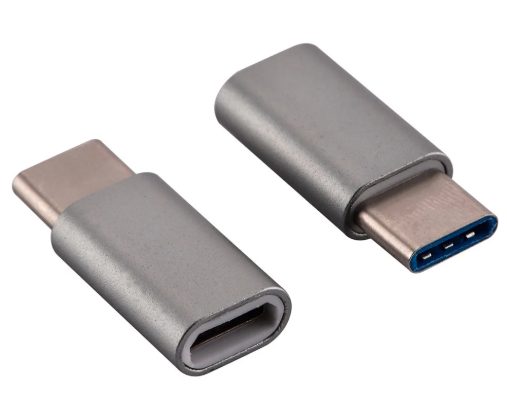
Figure 7. USB-C Adapter
To charge your devices safely and efficiently, it’s important to choose an adapter that matches both the cable you're using and the power needs of your device. Not all adapters are created equal, and using the wrong one can slow down charging or even damage your equipment over time.
A high-power USB Power Delivery (USB PD) adapter is designed to handle more demanding situations. These adapters are built to deliver up to 20 volts at 5 amps, which equals 100 watts of power. That’s the kind of performance needed for power-hungry devices like gaming laptops, high-resolution monitors, or docking stations. On the other hand, a standard USB-C adapter typically maxes out at 20 volts and 3 amps, giving you up to 60 watts. That’s usually enough for smartphones, tablets, and many lightweight laptops, but it might not meet the needs of heavier hardware.
Before using any adapter, take a few moments to check its specifications. You can usually find this information on the label printed on the adapter itself or in the technical datasheet provided. Look for:
• The output voltage and current it can supply
• The types of cables it’s designed to support
• A list of compatible device types or power ranges
• Certifications that confirm it meets electrical safety standards
Checking these details may only take a minute, but it’s a useful step to avoid problems like overheating, poor charging speeds, or even permanent device damage.
If the adapter delivers less power than your device requires, it may charge slowly, or not at all. If it tries to push more current than the cable or device is rated for, it can cause overheating, reduce battery lifespan, or damage internal components. To avoid these issues, always make sure the adapter’s specs meet or exceed the demands of the connected cable and device. When in doubt, go with a certified USB PD adapter that’s rated for 100 watts. It offers the most flexibility and helps ensure your devices get the power they need—safely and consistently.
CUI USB Power Delivery Solutions
• Performance You Can Count On - CUI’s USB Power Delivery adapters are engineered to handle demanding power requirements without compromising safety. Each unit is designed to deliver high wattage efficiently while maintaining a stable temperature, even during extended use. Power output is automatically adjusted to fit the specific needs of your device, ensuring reliable performance without the risk of overloading or overheating.
• Flexible Power for All Your Devices - Whether you're topping off a smartphone, powering a laptop, or charging a digital camera, CUI adapters are built to handle it all. Their internal architecture supports a wide voltage and current range, making them compatible with various device types and charging conditions. This versatility makes them an ideal solution for you who carry multiple devices and want a single, dependable charging option.
• Smarter Charging with Built-In Intelligence - Every adapter in CUI’s lineup includes integrated smart controller chips. These components identify the connected device’s power profile and adjust delivery accordingly. This not only ensures the fastest safe charging rate but also helps protect long-term battery health by avoiding unnecessary strain on the power system. The adjustment happens automatically—no manual configuration or switching modes. The charger evaluates the demand in actual and fine-tunes its output to meet the exact requirements of the moment, whether the device is idle, active, or under heavy load.
• Future-Proof by Design - Built on the USB PD 3.0 specification, CUI’s adapters are fully compatible with modern devices and are ready for upcoming generations of tech. They support high-speed charging and advanced power delivery features expected in future devices, offering long-term value without the need for constant upgrades.
CUI AC-DC Adapters
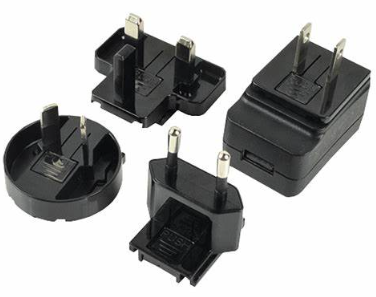
Figure 8. CUI AC-DC Adapters
CUI’s AC-DC power adapters are designed to extend the benefits of USB Power Delivery across a wide range of electronics, from small, portable devices to power-intensive laptops. Whether you’re at home, at the office, or on the move, these adapters provide consistent, high-quality power delivery without the need for multiple chargers.
• Efficient Power That Works Smarter - Each adapter is built with advanced internal circuitry that focuses on minimizing power waste. Instead of letting extra energy turn into unwanted heat, the design channels electricity efficiently to your device. This leads to lower energy consumption and less heat buildup—ideal for keeping both devices and workspaces cooler and safer.
• Automatic Adjustment, No Setup Needed - CUI adapters are built to be as straightforward as possible. Once plugged in, they automatically detect the power needs of the connected device and adjust the output to match. This smart output control means you don’t have to manually choose settings or worry about compatibility. Whether you're charging a compact accessory or a larger machine, the adapter adapts on its own to deliver fast, stable power.
• Safe, Standard-Compliant, and Ready for What’s Next - Built to meet the latest USB Power Delivery specifications, these adapters are fully compliant with modern charging standards. That means they’re not only secure and reliable for today’s devices, but also built to support the increasing power needs of future technology. From smartphones to workstations, one adapter helps cover more ground without compromising safety.
USB PD vs. USB-C Pros and Cons
USB Power Delivery (USB PD) Pros
• USB PD stands out for its ability to deliver much higher power than standard USB. It can fast-charge devices by providing up to 100 watts. This makes it strong enough not just for phones, but for power-hungry devices like laptops and even monitors.
• Another major strength is its two-way charging feature. Devices that support USB PD can both receive and send power. For example, a laptop might charge a phone while it’s plugged in, or vice versa, depending on which device needs power.
• Smart power regulation is built in. USB PD automatically adjusts voltage and current to match what each device needs. This lowers the risk of overheating or battery damage and helps extend device lifespan.
• Because it can deliver high power, USB PD also allows a single cable to support multiple devices less cable clutter and more efficient setups, especially in workspaces or travel bags.
• The connectors and cables built for USB PD are designed to withstand frequent plugging and unplugging, making them a reliable option for daily use.
USB Power Delivery Cons
• To unlock the full 100W charging capability, both the cable and the power adapter must be USB PD-compatible. If either one isn’t, the system will fall back to lower charging speeds.
• USB PD gear tends to cost more than basic USB setups. This can be a consideration if you're equipping multiple devices or cables.
• Although USB PD is great for power, it doesn’t inherently support older USB Type-A or Type-B connections for data transfer. You’ll need an adapter or a dual-purpose hub to bridge that gap.
USB-C Pros
• USB-C is known for its simple, accessible design. You can plug it in from either side, so there’s no more flipping the cable around trying to get it right.
• It works with many different USB versions, including USB 2.0, 3.1, and even Thunderbolt 3. That makes it a very flexible choice for connecting new and old devices alike.
• A single USB-C cable can handle both charging and data transfer at the same time, thanks to multiple channels built into the connector. This reduces the need for extra cords and keeps things tidy.
• In general, USB-C cables are less expensive than full USB PD setups, making them a cost-effective choice for everyday needs.
USB-C Cons
• Standard USB-C cables usually top out at 60W for charging. That’s fast enough for phones and many tablets, but slower compared to USB PD, especially when powering laptops or larger devices.
• Over time, the physical connector can wear down with repeated use. This might lead to unstable connections, especially for high-speed data transfers.
• In some cases, older or lower-quality USB-C cables may lose performance after prolonged use. This can show up as slower charging or inconsistent data transfers.
Conclusion
USB Power Delivery and USB-C represent the future of wired charging and connectivity, designed to meet the evolving needs of modern electronics. USB PD brings speed, safety, and adaptability to power transfer, while USB-C offers a compact, versatile connector that supports high-speed data and video transmission. When combined, they create a single-cable solution that reduces complexity without sacrificing performance. Understanding how USB PD and USB-C work together ensures you're getting the most from your gear today and tomorrow.
Frequently Asked Questions [FAQ]
1. What is the function of a charging connector?
The charging connector is responsible for physically linking a device to a power source so that electrical power, and in many cases, data can flow between them. In everyday use, the connector needs to fit securely into the device's port to ensure a stable connection. A loose or poorly inserted connector can cause charging interruptions or fail to charge the device at all. With modern connectors like USB-C, you benefit from a reversible design, which makes plugging in quicker and helps reduce long-term wear on both the cable and the device.
2. Is a PD charger better than a normal charger?
Yes, a PD (Power Delivery) charger is better than a normal charger for most modern devices. It offers faster charging by adjusting the voltage and current to match the device’s needs, and it does this safely. In actual use, a PD charger can charge your phone or laptop much faster, often reaching 50% in around 30 minutes, compared to a regular charger. It also generates less heat during charging, which helps protect the battery and extend its lifespan. Overall, it’s more efficient and future-proof.
3. Can I use a PD charger with any phone?
You can use a PD charger with any phone, but the benefits depend on whether the phone supports USB Power Delivery. If the phone is compatible, it will charge faster by communicating with the charger to receive more power. If the phone doesn’t support PD, it will still charge, but at the standard speed, without taking advantage of the faster charging capabilities. In either case, there’s no risk of damage because the PD system only delivers what the device requests.
4. How does PD charging work?
PD charging works by allowing the device and charger to communicate and agree on the safest and most efficient power level before charging begins. When you plug a PD-compatible device into a PD charger, the device sends a signal requesting a specific amount of power. The charger responds by offering its available options, and then both sides agree on the right voltage and current combination. This negotiation happens automatically and ensures that the device gets exactly what it needs, no more, no less. It also allows the device to increase or reduce power flow as needed during charging.
5. Does PD charging require a special cable?
Yes, PD charging requires a cable that supports both higher power levels and communication between the charger and the device. Not all USB-C cables can do this. Some cheaper or older cables might only handle basic charging and can limit the performance of a PD charger. To get full PD charging, you need a certified USB-C to USB-C cable rated for higher power, often marked as 60W or 100W. For Apple devices, you also need a USB-C to Lightning cable that supports PD. Using the right cable is serious for achieving fast and safe charging.
Related Article
-
![How to Choose the Right Motor Capacitor?]() Apr 25 2025How to Choose the Right Motor Capacitor?
Apr 25 2025How to Choose the Right Motor Capacitor?If your motor won’t start or runs unevenly, the capacitor might be the reason. Capacitors play a big role in helping motors start and run smoothly es... -
![Guide to 1, 3, 5, 10, 15, 20, 30, and 40 Amp Fuses: Specification and Uses]() Apr 24 2025Guide to 1, 3, 5, 10, 15, 20, 30, and 40 Amp Fuses: Specification and Uses
Apr 24 2025Guide to 1, 3, 5, 10, 15, 20, 30, and 40 Amp Fuses: Specification and UsesAmp fuses are small but powerful safety parts used in many electric systems. From home appliances to cars and big machines, these fuses help stop dama...
Related products
GRM1886R1H3R5CZ01D
CAP CER 3.5PF 50V R2H 0603
EEC-S5R5H105
CAP 1F -20% +80% 5.5V T/H
T494X226K050AT
CAP TANT 22UF 10% 50V 2917

PI49FCT20802QE
IC CLK BUFFER 1:5 150MHZ 16QSOP

PI6C185-01LE
IC CLK BUFFER 1:5 140MHZ 16TSSOP

MB9AF342NBPMC-G-JNE2
IC MCU 32BIT 160KB FLASH 100LQFP

FS200R07PE4
IGBT Modules

LTC2053HMS8
IC OPAMP ZER-DRIFT 1CIRC 8MSOP

M74LCX138RM13TR
M74LCX138RM13TR ST
BC57E687CAU
BC57E687CAU CSR
CY2210PVC-3A
CY2210PVC-3A CY

EPM7064STI100-10N
EPM7064STI100-10N ALTERA

AM7943JC
AMD PLCC32